

TL;DR I can't uncheck NET Framework 4.8 from Server 2022:
I'm troubleshooting a problem with an ERP system that we're trying to deploy. The server software runs atop SQL Server and uses AD, so I've got SQL Server 2022 freshly installed on a freshly installed Server 2022.
With vendor handholding me, we got server software installed on the server VM, then installed the client software on the same VM, where it ran correctly.
Then I installed the client software on a Win10 PC, and it ran correctly.
Then we installed the vendor's latest service pack on the server software, updated the client software on the server, and then updated the client software on the client PC.
Now we can no longer run the client installer, because the client installer barfs with an Event 1026, .NET Runtime:
This occurred trying to run the client installer on the server VM, on the client PC that we installed originally (though the existing installed client still runs properly!), nor on 2 other client PCs that we attempted to run the installer on.
After trying a hundred things that didn't work, I suggested it was a .NET mismatch, so we went to Add Features on the server and checked the box for .NET Framework 4.8 Features. It installed successfully, and then there were a couple of Updates that wanted to run, so we let those all install, rebooted, and then ran the client installer successfully on the server.
So I went back to the first client PC and checked the box for .NET Framework 4.8 Features, installed, rebooted, and the client installer still fails with the same error.
In an attempt to backtrack a little bit, I want to disable/uninstall .NET Framework 4.8 Features on the server VM to see if I can reproduce the problem there.
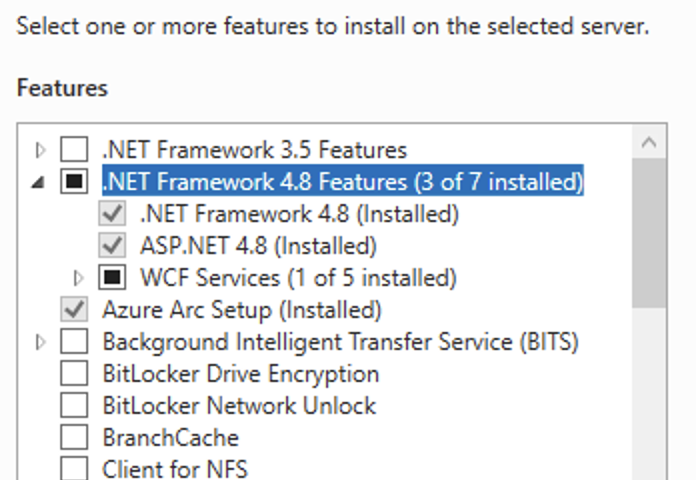
But, as shown in the above screen capture, the checkbox is grayed out now, so I can't disable/uninstall it.
Any suggestions?
I'm troubleshooting a problem with an ERP system that we're trying to deploy. The server software runs atop SQL Server and uses AD, so I've got SQL Server 2022 freshly installed on a freshly installed Server 2022.
With vendor handholding me, we got server software installed on the server VM, then installed the client software on the same VM, where it ran correctly.
Then I installed the client software on a Win10 PC, and it ran correctly.
Then we installed the vendor's latest service pack on the server software, updated the client software on the server, and then updated the client software on the client PC.
Now we can no longer run the client installer, because the client installer barfs with an Event 1026, .NET Runtime:
Code:
Application: INTUIT~1.EXE
Framework Version: v4.0.30319
Description: The process was terminated due to an unhandled exception.
Exception Info: System.IO.FileNotFoundException
   at IntuitiveUI_ClientUtility.Program.Main(System.String[])
This occurred trying to run the client installer on the server VM, on the client PC that we installed originally (though the existing installed client still runs properly!), nor on 2 other client PCs that we attempted to run the installer on.
After trying a hundred things that didn't work, I suggested it was a .NET mismatch, so we went to Add Features on the server and checked the box for .NET Framework 4.8 Features. It installed successfully, and then there were a couple of Updates that wanted to run, so we let those all install, rebooted, and then ran the client installer successfully on the server.
So I went back to the first client PC and checked the box for .NET Framework 4.8 Features, installed, rebooted, and the client installer still fails with the same error.
In an attempt to backtrack a little bit, I want to disable/uninstall .NET Framework 4.8 Features on the server VM to see if I can reproduce the problem there.
But, as shown in the above screen capture, the checkbox is grayed out now, so I can't disable/uninstall it.
Any suggestions?


 , so I can't even add it back for easy repeatability testing.