Optimizing WiFi coverage

sakete

Ars Scholae Palatinae
1,083
Subscriptor++
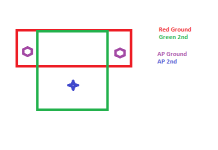
I just moved into a new house and have 2 UniFi APs installed. A U7 Pro Max and U7 Pro. It's a split level house, kind of in a T shape. The horizontal bar of the T is the lower level where I have the APs installed on opposite ends, wall mounted high (the ceiling is angled into a point on both ends, not flat). The upper level with 3 bedrooms is on the vertical bar of the T, which is also where my office is.

Downstairs I have excellent signal strength in every corner of the house. Upstairs, particularly in my office where I need it the most, signal strength is a lot weaker.

I installed the Wifiman App, but apparently to do a full scan I need to buy a $99 Wifiman Wizard device (used to be able to be done directly from the phone?).

I'm wondering if I should move one of the APs more towards the center of the house, or buy a third AP (like a U7 Lite) that I'd ceiling mount upstairs. Mostly care for work and stuff, videoconferencing and just generally having a snappy connection.

What would be the right approach here?
 

evan_s

Ars Tribunus Angusticlavius
7,517
Subscriptor
For a home office is there any potential for a wired connection? Could you run new wiring, repurpose existing cat 5, use a MOCA adapter with some COAX? Wireless is great for devices that need to be mobile but for a home office a wired connect is always going to be better.

How would the additional router be connected? A WIFI repeater? For WIFI coverage I find that while it doesn't need line of sight and will go through walls and such I find it helpful to still think of it in that sort of way. Going through a wall or something is going to block some of the signal so even somewhat small changes can potentially help just by reducing the number of things the signal would have to go through. It sounds like the horizonal part of the T is pretty open so your two routers might do better with one central router and the other router near the other end of the vertical bar of the T. If you are using WIFI repeaters the signal strength between the device and the repeater won't help if the connection between the repeater and the other router is weak.
 

sakete

Ars Scholae Palatinae
1,083
Subscriptor++
For a home office is there any potential for a wired connection? Could you run new wiring, repurpose existing cat 5, use a MOCA adapter with some COAX? Wireless is great for devices that need to be mobile but for a home office a wired connect is always going to be better.

How would the additional router be connected? A WIFI repeater? For WIFI coverage I find that while it doesn't need line of sight and will go through walls and such I find it helpful to still think of it in that sort of way. Going through a wall or something is going to block some of the signal so even somewhat small changes can potentially help just by reducing the number of things the signal would have to go through. It sounds like the horizonal part of the T is pretty open so your two routers might do better with one central router and the other router near the other end of the vertical bar of the T. If you are using WIFI repeaters the signal strength between the device and the repeater won't help if the connection between the repeater and the other router is weak.
I can hardwire it, as I have this laptop docked. But then when I disconnect from the dock, which I sometimes do, it tends to get all wonky with it needing to switch over to WiFi, which is why I generally prefer to keep these laptops connected to WiFi. Also, work laptops I prefer to keep on the guest network in case they're snooping on my stuff. But I also dock my personal laptop to this dock, and that needs to be on the main network. Overall WiFi is a bit more flexible in that regard.

The APs themselves are all hardwired (PoE). And I wouldn't be installing a repeater, it would be an additional access point, or I'd move things around. But perhaps I should experiment with different placement of the APs before spending money on another AP.
 

meisanerd

Ars Scholae Palatinae
1,572
Subscriptor
Odd that you are seeing a required purchase for something, I just launched Wifiman, went to the Signal tab and flipped over to "Floor Plan", and it let me create one just fine. Unless they have added some sort of device restriction recently due to hardware changes (I think I've seen something about iOS privacy settings preventing it from scanning in the way that it needs to).

If the APs are at opposite ends of the house, I would look at moving them in a bit first, and seeing what that does.
 

Axl

Ars Scholae Palatinae
644
I'm not saying it's the right approach for you, but I have a two story house (not huge, ~1850 SF, very boxy) and I have two U7 Pro's on either end of the upstairs level. Both are ceiling-mounted a couple of feet in from the edge. I get excellent signal strength both upstairs and downstairs, and anywhere in the yard; even get medium-to-low signal far down the driveway. Both APs are wired to switches, and i don't bother with 6GHz.
 

Andrewcw

Ars Legatus Legionis
19,047
Subscriptor
I stopped with Unifi for awhile so i have no idea what the controller looks like now. But Wifiman show only some of the detail. The detail you want is on the controller itself. Take a look at the RSSI the clients have from the Controller's perspective. Make sure the signal they get back is strong.

I would look into a 3rd AP of the Long Range variety for upstairs. If placement downstairs is working very good as far as you can tell. Moving them so the top floor gets a better signal might just drastically disturb downstairs. Most ceiling mount Unifi is all Dome shaped where it's radial and the "Front side" is supposed to be aimed down and that's the strong side. The "Ceiling" side is way weaker. And can we assume these are ceiling mounted and not wall mounted?

I don't think they've changed their lineup that much. But their "Long Range" version just has a better antenna design that receives better. The distance increase is more because the Client side is able to talk back. You want to place it on the ceiling and hopefully not above.

Do a crude drawing. As describing it as a T-shape doesn't make much sense. Unless Under that "T" is something like a garage you're not counting. Bonus points. Mark stairwells and where bathrooms are.
 

Attachments

  • Untitledexam.png
    Untitledexam.png
    3.7 KB · Views: 3

wxfisch

Ars Scholae Palatinae
1,037
Subscriptor++
Odd that you are seeing a required purchase for something, I just launched Wifiman, went to the Signal tab and flipped over to "Floor Plan", and it let me create one just fine. Unless they have added some sort of device restriction recently due to hardware changes (I think I've seen something about iOS privacy settings preventing it from scanning in the way that it needs to).

If the APs are at opposite ends of the house, I would look at moving them in a bit first, and seeing what that does.
I just checked on my iPhone and the Signal tab both lets you see a graph of signal strength, latency, or throughput or you can flip over to floor plan and walk around to create full map of your house. The Scan tab does prompt you to grab the WiFiMan dongle but you don't need it to use the app.
 

meisanerd

Ars Scholae Palatinae
1,572
Subscriptor
I just checked on my iPhone and the Signal tab both lets you see a graph of signal strength, latency, or throughput or you can flip over to floor plan and walk around to create full map of your house. The Scan tab does prompt you to grab the WiFiMan dongle but you don't need it to use the app.
Scan tab still shows me the list of all the nearby APs it can find on my Android device. So that might be the difference, iOS doesn't let apps do scans for nearby access points without the dongle...

@sakete give the floorplan scanning a try if that works on your device to try to figure out your signal strength everywhere. You can do that, then move the APs around and run it again to see what it changes, and use that to see if you have any large dead zones in your house that would make a third AP useful (some constructions will dead-zone signals, my boss' house needed like 4 APs to cover the same square footage as mine due to the previous owner of his place going crazy with a lot of decorative wall stuff that blocks signals).
 

Da Xiang

Ars Tribunus Angusticlavius
7,097
Subscriptor
Odd that you are seeing a required purchase for something, I just launched Wifiman, went to the Signal tab and flipped over to "Floor Plan", and it let me create one just fine. Unless they have added some sort of device restriction recently due to hardware changes (I think I've seen something about iOS privacy settings preventing it from scanning in the way that it needs to).

If the APs are at opposite ends of the house, I would look at moving them in a bit first, and seeing what that does.
Agreed. I would divide the house into 4ths and move both access points to the inner edge of the two outside 4ths. That way each AP is responsible for 1/2 of the house without any overlaps. The way that @sakete describes could leave the center 3rd of the house with the weakest signal. Then, if the office upstairs isn't helped, add another AP in the middle of the upstairs which would provide maximum coverage in the middle of both floors while the two outer ones should also serve both up and down effectively (unless you have a Faraday cage built into your home's framing—:p)